Terminal & Browser is all I need — A Web wizard heuristic!
Snehith | from Tech · Lifestyle | 4 min read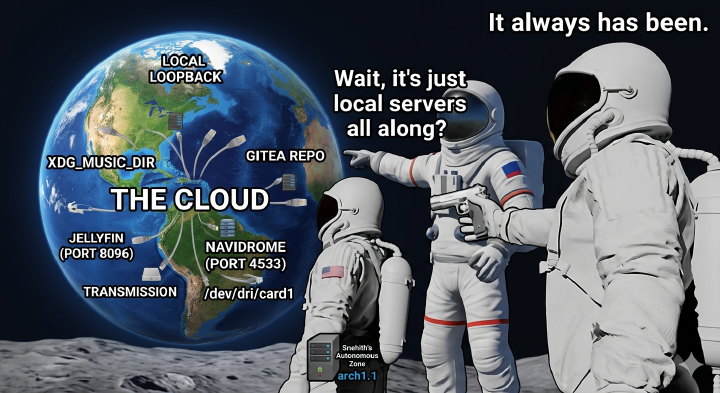
There is a polarizing duality to the modern web. But strip away the bloat, the tracking, and the noise, and you find what I consider the greatest modern development in software: Web Apps.
The idea is genius when you actually think about it. Web Apps are a wet dream for a developer and a hacker alike:
- A unified development platform: One ecosystem to rule them all.
- Platform independent: If it has a browser, it runs.
- Write once, run everywhere: The ultimate cross-platform promise, finally realized.
- Open protocols by default: Unless corporate gatekeepers force it otherwise.
- Easy on your hardware: Bypasses the massive resource tax of a traditional Desktop Environment, forcing your local silicon to focus purely on backend daemon efficiency and viewport rendering.
After 5 years of distro-hopping up to Arch on Hyprland, I wiped my ThinkPad T480 to test a radical, ultra-minimalist experiment: turning a legendary piece of local hardware into a bare-metal, offline-first Web OS.
The origin of this idea comes from Chromebooks. They were good, but they missed the mark. To truly make a powerhouse OS out of the web, you need to give full, unrestricted power to the browser on your own bare metal.
The Idea
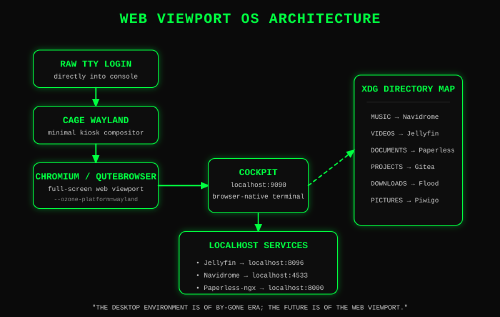
The blueprint is simple, lightweight, and incredibly fast. We are stripping away the desktop environment entirely. No GNOME, no Hyprland, no display manager. Just local silicon bootloading straight into a viewport.
- Base: Any modern PC or laptop.
- OS: Arch with the Zen kernel (for that sweet, low-latency responsiveness, bleeding-edge software stack).
- The Stack: Install a bare server with no GUI, no bloat, nothing. Then, just pull in Cage (a lightweight Wayland kiosk compositor), Cockpit (the ultimate web-based server admin tool), and Chromium or qutebrowser (if you hate Chrome and love Vim bindings—I certainly do).
That’s it for the foundation.
The “OS” in Action
The magic manifests at boot. You authenticate directly into a raw TTY console and execute a single command line:
cage -- chromium --ozone-platform=wayland --kiosk
Or, if you live by Vim keys and demand a razor-thin memory footprint, swap Chromium for qutebrowser. (Expect minor rendering quirks on bloated corporate intranets; if you’re chained to enterprise web stacks, stick to Chromium).
cage -- qutebrowser
Because Cage talks directly to your graphics drivers via KMS/DRM, a borderless, full-screen Chromium viewport snaps into view immediately. No tedious environment variables or display managers required.
From this pristine viewport, you point the browser directly at your local loopback address:
http://127.0.0.1:9090
This lands you directly into Cockpit. The true elegance here is that Cockpit provides a fully featured, high-performance terminal emulator directly within a web browser tab. You are now commanding your underlying Linux architecture entirely through a web interface.
From this embedded terminal, you spin up your essential local system services: PipeWire for audio routing, BlueZ for Bluetooth, and your core hardware utilities. Once the base is humming, you map dedicated, local web applications to your home directories to handle your entire digital lifecycle:
http://localhost:4533  -->  [ Navidrome / Local Audio Streaming ]
http://localhost:8096  -->  [ Jellyfin / Hardware-Accelerated Video ]
http://localhost:8000  -->  [ Paperless-ngx / Document Lifecycle ]
You aren’t just driving a web browser anymore. You have converted your local physical silicon into a self-hosted, air-gapped personal appliance. It is peak digital minimalism, and it is bulletproof.
Wizard Pro-Tip (The Escape Hatch): If a rogue script ever locks up your viewport and Chromium hangs, don’t panic. You haven’t lost the machine. A swift Ctrl+Alt+F2 drops you straight down into a secondary, raw TTY console to nuke the process and reclaim your throne.
The GPL XDG 1-to-1 Mapping Matrix
To enforce complete digital sovereignty, every application in this stack is bound strictly by copyleft GPL licenses. No corporate open-core bait-and-switches, no telemetry. Just pure local loopback pipelines mapping directly to standard XDG user directories:
| XDG Target Directory | Recommended GPL App | Local Workspace Action |
|---|---|---|
XDG_DESKTOP_DIR | File Browser | A web-native canvas to drag, drop, and butcher temporary files. |
XDG_DOCUMENTS_DIR | Paperless-ngx | Local OCR pipelines pulling text directly from raw PDFs. |
XDG_DOWNLOAD_DIR | Flood + Transmission | A sleek, rapid-fire dashboard driving local bit-torrent management. |
XDG_MUSIC_DIR | Navidrome | An ultra-lightweight sonic jukebox serving your local audio directory. |
XDG_PICTURES_DIR | Piwigo | Spawns fast-loading thumbnails via native magick system calls. |
XDG_PROJECTS_DIR | Gitea | A single-binary local git forge running completely offline. |
XDG_PUBLICSHARE_DIR | Samba (Web) | Zero-auth local pipes to instantly beam assets to your hardware. |
XDG_TEMPLATES_DIR | Gitea Snippets | Built-in repository markdown to instantly load boilerplate scripts. |
XDG_VIDEOS_DIR | Jellyfin | Feeds your hardware-accelerated graphics stack via native ffmpeg. |
Crucial Distinction: There is no remote server. There is no internet required. When I hit localhost:8096 for Jellyfin, the browser is talking directly to the NVMe drive sitting beneath my keyboard.
Wizard Pro-Tip (Hardware Keys): Without a bloated desktop manager intercepting your laptop’s media keys, you lose native brightness and volume controls. Don’t panic. Pull in light for backlight manipulation and use PipeWire’s native wpctl for audio. Map them directly to hardware event lines via a lightweight background daemon like actkbd or bind them within your shell profile. Total control, zero UI bloat.